
May 2020
Partner Product
Everyone misses the lab.
How can we deliver the next best experience?
The lab experience is the most formative aspect of an ECE student's academic journey. It allows them to apply what they've learned from theory, textbooks, and lectures and bring it to life in the real world. COVID-19 has thrown students, universities, and partners into a new paradigm. Hopefully this will soon pass so we can continue hands-on approaches to learning, but the past few months have made remote education a reality, limiting access to lab experiments and tutorials.
Liquid Instruments has just recently announced the Moku:Lab Windows App. The remote desktop application allows anyone to remotely access Moku:Lab instruments over the internet. For more details on Moku:Lab and the 12 supported instruments, please click here
Setup
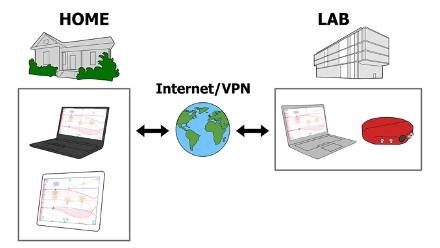
First, during your virtual lesson on any popular video conferencing solution, you can set up your students for success by screen sharing the iPad or the Windows app. The dynamic nature of each instrument makes sharing intuitive and easy to follow. Once the lesson is complete, students are ready to access the experiment themselves and get to work.
In your university lab, set up your Moku:Lab with a Windows PC running Moku:Lab Windows App. At home, deploy your university lab remote VPN solution, and together with Microsoft Remote Desktop you have full remote control of your Moku:Lab.
Students can remotely access the lab on iPad, Windows or MacOS machines from their home or dorm, conduct assigned tutorials, take measurements, and gain valuable lab experience while observing stay-at-home guidelines.
The Liquid Instruments team is available to help anyway we can to deliver an impactful experience for ECE students. Be safe and healthy.
Sincerely,
The Liquid Instruments team (at home)
info@liquidinstruments.com